
中
NEWS
02
2024
-
02
Experience Smart Lighting with WiFi Tuya Bulbs
Table of Contents:
1. Introduction: The Evolution of Lighting Technology
2. What are WiFi Tuya Bulbs?
3. Benefits of WiFi Tuya Bulbs
4. Setting Up WiFi Tuya Bulbs: A Step-by-Step Guide
5. Customizing Your Lighting Experience
6. Integrating WiFi Tuya Bulbs with Smart Home Systems
7. FAQs: Your Questions Answered
8. Conclusion
1. Introduction: The Evolution of Lighting Technology
From traditional incandescent bulbs to energy-efficient LEDs, lighting technology has come a long way. With the advent of smart home technology, we are now witnessing the rise of WiFi Tuya bulbs, which offer an unparalleled level of control and convenience. Say goodbye to manual switches and explore the world of smart lighting.
2. What are WiFi Tuya Bulbs?
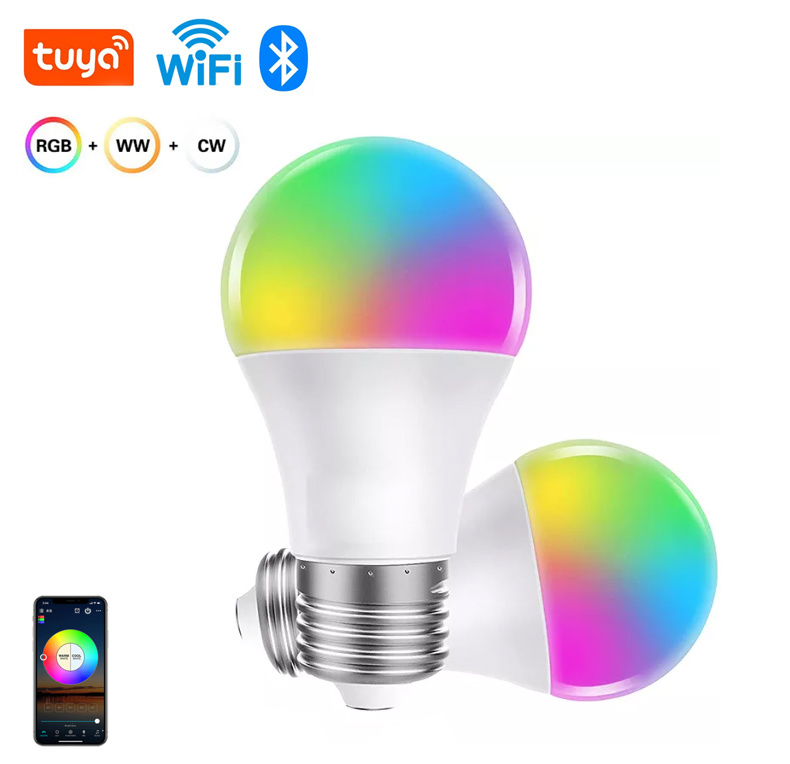
WiFi Tuya bulbs are innovative lighting solutions that connect to your home's WiFi network, enabling you to control them remotely through a dedicated mobile app. These bulbs come with built-in WiFi capability, eliminating the need for additional hubs or bridges. With WiFi Tuya bulbs, you can customize the brightness, color temperature, and even set up schedules or timers.
3. Benefits of WiFi Tuya Bulbs
- Convenient Control: With just a few taps on your smartphone, you can turn your lights on or off, adjust brightness levels, and even change colors to suit your mood or activity.
- Energy Efficiency: WiFi Tuya bulbs are designed with energy-saving features, allowing you to reduce your electricity consumption without sacrificing lighting quality.
- Personalization: Experiment with different colors and create dynamic lighting scenes to enhance your living spaces. Set the mood for relaxation, concentration, or entertainment with ease.
- Seamless Integration: WiFi Tuya bulbs can be integrated with other smart home devices, such as voice assistants or motion sensors, to create a truly connected living environment.
- Cost Savings: While the initial investment may be higher compared to traditional bulbs, the long-term cost savings from energy efficiency and durability make WiFi Tuya bulbs a wise choice.
4. Setting Up WiFi Tuya Bulbs: A Step-by-Step Guide
- Download the dedicated mobile app from the App Store or Google Play.
- Ensure that your WiFi Tuya bulbs are properly installed and screwed into the desired light fixtures.
- Launch the app and create an account if prompted.
- Follow the on-screen instructions to connect the bulbs to your home's WiFi network.
- Once connected, you can start exploring the various features and settings available in the app.
5. Customizing Your Lighting Experience
WiFi Tuya bulbs offer a range of customizable options to suit your preferences and needs:
- Brightness Control: Adjust the brightness of your bulbs to create the perfect ambiance for any occasion.
- Color Temperature: Set the color temperature of your bulbs to warm, neutral, or cool white to match your desired lighting atmosphere.
- Color Selection: Experience a rainbow of colors by choosing from the wide range available on the app. Create vibrant lighting effects or soothing hues to suit your mood.
- Schedules and Timers: Set up schedules or timers to automate your lighting, ensuring that your lights turn on or off at specific times or according to your daily routines.
6. Integrating WiFi Tuya Bulbs with Smart Home Systems
WiFi Tuya bulbs can be seamlessly integrated with popular smart home systems, including Google Home, Amazon Alexa, and Apple HomeKit. This integration allows you to control your lighting using voice commands, creating a truly hands-free experience. Imagine effortlessly dimming the lights or changing colors with a simple voice prompt.
7. FAQs: Your Questions Answered
Q1: Can I control WiFi Tuya bulbs when I'm away from home?
A1: Yes, as long as your smartphone is connected to the internet, you can control your WiFi Tuya bulbs from anywhere in the world.
Q2: Are WiFi Tuya bulbs compatible with dimmer switches?
A2: No, WiFi Tuya bulbs are not compatible with dimmer switches. They are designed to be controlled via the dedicated mobile app or voice commands.
Q3: Can multiple WiFi Tuya bulbs be grouped together?
A3: Absolutely! WiFi Tuya bulbs can be easily grouped together in the app, allowing you to control multiple bulbs simultaneously.
Q4: How long do WiFi Tuya bulbs last?
A4: WiFi Tuya bulbs are designed to have a long lifespan, typically ranging from 15,000 to 25,000 hours, depending on usage.
Q5: Are WiFi Tuya bulbs safe to use?
A5: Yes, WiFi Tuya bulbs undergo rigorous safety testing to ensure they meet industry standards. They are as safe to use as traditional bulbs.
8. Conclusion
Experience the future of lighting with WiFi Tuya bulbs and unlock a world of possibilities. Control your lighting from the palm of your hand, personalize your living spaces, and enjoy the convenience of smart home integration. Embrace the power of smart lighting and elevate your everyday experiences with WiFi Tuya bulbs.
1. Introduction: The Evolution of Lighting Technology
2. What are WiFi Tuya Bulbs?
3. Benefits of WiFi Tuya Bulbs
4. Setting Up WiFi Tuya Bulbs: A Step-by-Step Guide
5. Customizing Your Lighting Experience
6. Integrating WiFi Tuya Bulbs with Smart Home Systems
7. FAQs: Your Questions Answered
8. Conclusion
1. Introduction: The Evolution of Lighting Technology
From traditional incandescent bulbs to energy-efficient LEDs, lighting technology has come a long way. With the advent of smart home technology, we are now witnessing the rise of WiFi Tuya bulbs, which offer an unparalleled level of control and convenience. Say goodbye to manual switches and explore the world of smart lighting.
2. What are WiFi Tuya Bulbs?
WiFi Tuya bulbs are innovative lighting solutions that connect to your home's WiFi network, enabling you to control them remotely through a dedicated mobile app. These bulbs come with built-in WiFi capability, eliminating the need for additional hubs or bridges. With WiFi Tuya bulbs, you can customize the brightness, color temperature, and even set up schedules or timers.
3. Benefits of WiFi Tuya Bulbs
- Convenient Control: With just a few taps on your smartphone, you can turn your lights on or off, adjust brightness levels, and even change colors to suit your mood or activity.
- Energy Efficiency: WiFi Tuya bulbs are designed with energy-saving features, allowing you to reduce your electricity consumption without sacrificing lighting quality.
- Personalization: Experiment with different colors and create dynamic lighting scenes to enhance your living spaces. Set the mood for relaxation, concentration, or entertainment with ease.
- Seamless Integration: WiFi Tuya bulbs can be integrated with other smart home devices, such as voice assistants or motion sensors, to create a truly connected living environment.
- Cost Savings: While the initial investment may be higher compared to traditional bulbs, the long-term cost savings from energy efficiency and durability make WiFi Tuya bulbs a wise choice.
4. Setting Up WiFi Tuya Bulbs: A Step-by-Step Guide
- Download the dedicated mobile app from the App Store or Google Play.
- Ensure that your WiFi Tuya bulbs are properly installed and screwed into the desired light fixtures.
- Launch the app and create an account if prompted.
- Follow the on-screen instructions to connect the bulbs to your home's WiFi network.
- Once connected, you can start exploring the various features and settings available in the app.
5. Customizing Your Lighting Experience
WiFi Tuya bulbs offer a range of customizable options to suit your preferences and needs:
- Brightness Control: Adjust the brightness of your bulbs to create the perfect ambiance for any occasion.
- Color Temperature: Set the color temperature of your bulbs to warm, neutral, or cool white to match your desired lighting atmosphere.
- Color Selection: Experience a rainbow of colors by choosing from the wide range available on the app. Create vibrant lighting effects or soothing hues to suit your mood.
- Schedules and Timers: Set up schedules or timers to automate your lighting, ensuring that your lights turn on or off at specific times or according to your daily routines.
6. Integrating WiFi Tuya Bulbs with Smart Home Systems
WiFi Tuya bulbs can be seamlessly integrated with popular smart home systems, including Google Home, Amazon Alexa, and Apple HomeKit. This integration allows you to control your lighting using voice commands, creating a truly hands-free experience. Imagine effortlessly dimming the lights or changing colors with a simple voice prompt.
7. FAQs: Your Questions Answered
Q1: Can I control WiFi Tuya bulbs when I'm away from home?
A1: Yes, as long as your smartphone is connected to the internet, you can control your WiFi Tuya bulbs from anywhere in the world.
Q2: Are WiFi Tuya bulbs compatible with dimmer switches?
A2: No, WiFi Tuya bulbs are not compatible with dimmer switches. They are designed to be controlled via the dedicated mobile app or voice commands.
Q3: Can multiple WiFi Tuya bulbs be grouped together?
A3: Absolutely! WiFi Tuya bulbs can be easily grouped together in the app, allowing you to control multiple bulbs simultaneously.
Q4: How long do WiFi Tuya bulbs last?
A4: WiFi Tuya bulbs are designed to have a long lifespan, typically ranging from 15,000 to 25,000 hours, depending on usage.
Q5: Are WiFi Tuya bulbs safe to use?
A5: Yes, WiFi Tuya bulbs undergo rigorous safety testing to ensure they meet industry standards. They are as safe to use as traditional bulbs.
8. Conclusion
Experience the future of lighting with WiFi Tuya bulbs and unlock a world of possibilities. Control your lighting from the palm of your hand, personalize your living spaces, and enjoy the convenience of smart home integration. Embrace the power of smart lighting and elevate your everyday experiences with WiFi Tuya bulbs.
wifi tuya bulb
Related News

undefined

Zhongshan Hongdian Lighting Co., Ltd
Address: NO.18, Xier Rd. , Xinmao Industrial Zone, Henglan,Zhongshan, Guangdong, China
E-mail: sales01@redcle.com
Tel.: +86 15382781111
wechat: fangsheng598