
中
NEWS
06
2023
-
11
Upgrade Your Lighting with Affordable WiFi Tuya Bulbs
Table of Contents
1. Introduction: The Power of WiFi Tuya Bulbs
2. How WiFi Tuya Bulbs Work
3. Benefits of WiFi Tuya Bulbs
3.1 Energy Efficiency and Cost Savings
3.2 Customization and Control
3.3 Compatibility with Smart Home Systems
4. Installation and Setup
5. Brighten Your Home with WiFi Tuya Bulbs
5.1 Living Room Lighting
5.2 Bedroom Lighting
5.3 Kitchen Lighting
5.4 Bathroom Lighting
6. Frequently Asked Questions (FAQs)
6.1 How do I connect WiFi Tuya bulbs to my smartphone?
6.2 Can I schedule lighting routines with WiFi Tuya bulbs?
6.3 Are WiFi Tuya bulbs compatible with voice assistants like Alexa?
6.4 Can I dim WiFi Tuya bulbs?
6.5 Are WiFi Tuya bulbs suitable for outdoor use?
7. Conclusion: Illuminate Your Space with WiFi Tuya Bulbs
1. Introduction: The Power of WiFi Tuya Bulbs
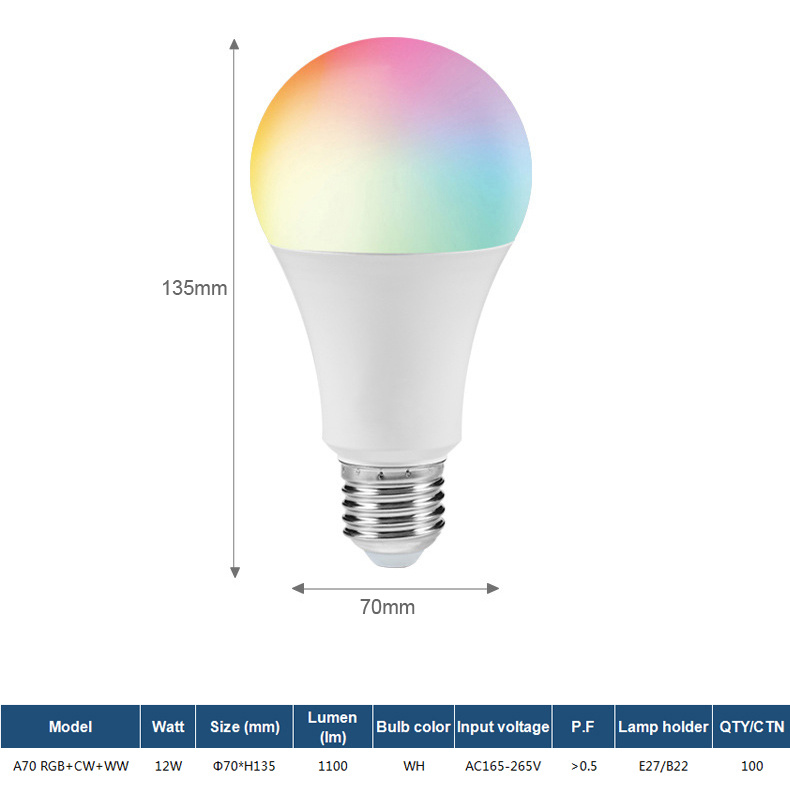
Lighting plays a crucial role in creating the right ambiance in any space. With WiFi Tuya bulbs, you can take control of your lighting like never before. These bulbs offer smart features that allow you to adjust brightness, color, and even set schedules, all from the convenience of your smartphone.
2. How WiFi Tuya Bulbs Work
WiFi Tuya bulbs use advanced technology to connect to your existing WiFi network. Once connected, they can be controlled through a dedicated mobile app, giving you the ability to customize your lighting settings effortlessly. The bulbs communicate with your smartphone directly, eliminating the need for additional hubs or devices.
3. Benefits of WiFi Tuya Bulbs
3.1 Energy Efficiency and Cost Savings
One of the significant advantages of WiFi Tuya bulbs is their energy efficiency. These bulbs are designed to consume less energy while providing sufficient brightness. By upgrading to WiFi Tuya bulbs, you can reduce your energy consumption and save on your electricity bills.
3.2 Customization and Control
With WiFi Tuya bulbs, you have full control over your lighting. Adjust the brightness to create a cozy atmosphere or set vibrant colors to match your mood. The mobile app allows for easy customization, enabling you to create personalized lighting scenes for different occasions.
3.3 Compatibility with Smart Home Systems
WiFi Tuya bulbs are compatible with popular smart home systems like Alexa, Google Assistant, and Apple HomeKit. This compatibility enables you to integrate your lighting with other smart devices in your home, creating a seamless and interconnected experience.
4. Installation and Setup
Installing WiFi Tuya bulbs is a breeze. Simply replace your existing bulbs with the WiFi Tuya bulbs, ensuring they are securely screwed in. Download the dedicated mobile app and follow the step-by-step instructions to connect the bulbs to your WiFi network. Once connected, you can start enjoying the smart features of the WiFi Tuya bulbs.
5. Brighten Your Home with WiFi Tuya Bulbs
5.1 Living Room Lighting
Upgrade your living room lighting with WiFi Tuya bulbs to create the perfect ambiance for relaxing or entertaining guests. Adjust the brightness to suit different activities and customize the color to match your decor. With the ability to set schedules, you can even simulate occupancy when you're away, enhancing your home security.
5.2 Bedroom Lighting
Transform your bedroom into a cozy retreat with WiFi Tuya bulbs. Set a warm and dimmed light for winding down in the evening or schedule a gradual sunrise simulation to wake up gently in the morning. The customizable lighting options promote relaxation and contribute to a better sleep environment.
5.3 Kitchen Lighting
Illuminate your kitchen with WiFi Tuya bulbs to enhance visibility and make cooking a breeze. Brighten up the space when preparing meals or dim the lights for a cozy dinner atmosphere. With voice control compatibility, you can even adjust the lighting while your hands are full.
5.4 Bathroom Lighting
Upgrade your bathroom lighting with WiFi Tuya bulbs to create a spa-like experience. Customize the brightness and color temperature to suit your needs. Whether you prefer bright and energizing light for your morning routine or a calming ambiance for a relaxing bath, WiFi Tuya bulbs have got you covered.
6. Frequently Asked Questions (FAQs)
6.1 How do I connect WiFi Tuya bulbs to my smartphone?
To connect WiFi Tuya bulbs to your smartphone, download the dedicated mobile app and follow the instructions provided. The app will guide you through the setup process, allowing you to connect the bulbs to your WiFi network.
6.2 Can I schedule lighting routines with WiFi Tuya bulbs?
Absolutely! WiFi Tuya bulbs offer scheduling capabilities, allowing you to set specific times for the lights to turn on or off. This feature is especially useful for simulating occupancy when you're away from home.
6.3 Are WiFi Tuya bulbs compatible with voice assistants like Alexa?
Yes, WiFi Tuya bulbs are compatible with popular voice assistants like Alexa, Google Assistant, and Apple HomeKit. You can control the bulbs using voice commands, making it even more convenient to adjust your lighting settings.
6.4 Can I dim WiFi Tuya bulbs?
Yes, WiFi Tuya bulbs support dimming functionality. You can easily adjust the brightness to create the ideal lighting level for any occasion or mood.
6.5 Are WiFi Tuya bulbs suitable for outdoor use?
While WiFi Tuya bulbs are primarily designed for indoor use, there are outdoor-rated options available. Make sure to check the product specifications and choose the appropriate bulbs for your outdoor lighting needs.
7. Conclusion: Illuminate Your Space with WiFi Tuya Bulbs
Upgrade your lighting experience with affordable WiFi Tuya bulbs. With their smart features, easy installation, and energy efficiency, these bulbs offer a cost-effective way to enhance your space. Whether you're looking to create a cozy atmosphere, improve home security, or customize your lighting scenes, WiFi Tuya bulbs provide the versatility and convenience you need. Explore the possibilities and transform your space today.
1. Introduction: The Power of WiFi Tuya Bulbs
2. How WiFi Tuya Bulbs Work
3. Benefits of WiFi Tuya Bulbs
3.1 Energy Efficiency and Cost Savings
3.2 Customization and Control
3.3 Compatibility with Smart Home Systems
4. Installation and Setup
5. Brighten Your Home with WiFi Tuya Bulbs
5.1 Living Room Lighting
5.2 Bedroom Lighting
5.3 Kitchen Lighting
5.4 Bathroom Lighting
6. Frequently Asked Questions (FAQs)
6.1 How do I connect WiFi Tuya bulbs to my smartphone?
6.2 Can I schedule lighting routines with WiFi Tuya bulbs?
6.3 Are WiFi Tuya bulbs compatible with voice assistants like Alexa?
6.4 Can I dim WiFi Tuya bulbs?
6.5 Are WiFi Tuya bulbs suitable for outdoor use?
7. Conclusion: Illuminate Your Space with WiFi Tuya Bulbs
1. Introduction: The Power of WiFi Tuya Bulbs
Lighting plays a crucial role in creating the right ambiance in any space. With WiFi Tuya bulbs, you can take control of your lighting like never before. These bulbs offer smart features that allow you to adjust brightness, color, and even set schedules, all from the convenience of your smartphone.
2. How WiFi Tuya Bulbs Work
WiFi Tuya bulbs use advanced technology to connect to your existing WiFi network. Once connected, they can be controlled through a dedicated mobile app, giving you the ability to customize your lighting settings effortlessly. The bulbs communicate with your smartphone directly, eliminating the need for additional hubs or devices.
3. Benefits of WiFi Tuya Bulbs
3.1 Energy Efficiency and Cost Savings
One of the significant advantages of WiFi Tuya bulbs is their energy efficiency. These bulbs are designed to consume less energy while providing sufficient brightness. By upgrading to WiFi Tuya bulbs, you can reduce your energy consumption and save on your electricity bills.
3.2 Customization and Control
With WiFi Tuya bulbs, you have full control over your lighting. Adjust the brightness to create a cozy atmosphere or set vibrant colors to match your mood. The mobile app allows for easy customization, enabling you to create personalized lighting scenes for different occasions.
3.3 Compatibility with Smart Home Systems
WiFi Tuya bulbs are compatible with popular smart home systems like Alexa, Google Assistant, and Apple HomeKit. This compatibility enables you to integrate your lighting with other smart devices in your home, creating a seamless and interconnected experience.
4. Installation and Setup
Installing WiFi Tuya bulbs is a breeze. Simply replace your existing bulbs with the WiFi Tuya bulbs, ensuring they are securely screwed in. Download the dedicated mobile app and follow the step-by-step instructions to connect the bulbs to your WiFi network. Once connected, you can start enjoying the smart features of the WiFi Tuya bulbs.
5. Brighten Your Home with WiFi Tuya Bulbs
5.1 Living Room Lighting
Upgrade your living room lighting with WiFi Tuya bulbs to create the perfect ambiance for relaxing or entertaining guests. Adjust the brightness to suit different activities and customize the color to match your decor. With the ability to set schedules, you can even simulate occupancy when you're away, enhancing your home security.
5.2 Bedroom Lighting
Transform your bedroom into a cozy retreat with WiFi Tuya bulbs. Set a warm and dimmed light for winding down in the evening or schedule a gradual sunrise simulation to wake up gently in the morning. The customizable lighting options promote relaxation and contribute to a better sleep environment.
5.3 Kitchen Lighting
Illuminate your kitchen with WiFi Tuya bulbs to enhance visibility and make cooking a breeze. Brighten up the space when preparing meals or dim the lights for a cozy dinner atmosphere. With voice control compatibility, you can even adjust the lighting while your hands are full.
5.4 Bathroom Lighting
Upgrade your bathroom lighting with WiFi Tuya bulbs to create a spa-like experience. Customize the brightness and color temperature to suit your needs. Whether you prefer bright and energizing light for your morning routine or a calming ambiance for a relaxing bath, WiFi Tuya bulbs have got you covered.
6. Frequently Asked Questions (FAQs)
6.1 How do I connect WiFi Tuya bulbs to my smartphone?
To connect WiFi Tuya bulbs to your smartphone, download the dedicated mobile app and follow the instructions provided. The app will guide you through the setup process, allowing you to connect the bulbs to your WiFi network.
6.2 Can I schedule lighting routines with WiFi Tuya bulbs?
Absolutely! WiFi Tuya bulbs offer scheduling capabilities, allowing you to set specific times for the lights to turn on or off. This feature is especially useful for simulating occupancy when you're away from home.
6.3 Are WiFi Tuya bulbs compatible with voice assistants like Alexa?
Yes, WiFi Tuya bulbs are compatible with popular voice assistants like Alexa, Google Assistant, and Apple HomeKit. You can control the bulbs using voice commands, making it even more convenient to adjust your lighting settings.
6.4 Can I dim WiFi Tuya bulbs?
Yes, WiFi Tuya bulbs support dimming functionality. You can easily adjust the brightness to create the ideal lighting level for any occasion or mood.
6.5 Are WiFi Tuya bulbs suitable for outdoor use?
While WiFi Tuya bulbs are primarily designed for indoor use, there are outdoor-rated options available. Make sure to check the product specifications and choose the appropriate bulbs for your outdoor lighting needs.
7. Conclusion: Illuminate Your Space with WiFi Tuya Bulbs
Upgrade your lighting experience with affordable WiFi Tuya bulbs. With their smart features, easy installation, and energy efficiency, these bulbs offer a cost-effective way to enhance your space. Whether you're looking to create a cozy atmosphere, improve home security, or customize your lighting scenes, WiFi Tuya bulbs provide the versatility and convenience you need. Explore the possibilities and transform your space today.
discount wifi tuya bulb
Related News

undefined

Zhongshan Hongdian Lighting Co., Ltd
Address: NO.18, Xier Rd. , Xinmao Industrial Zone, Henglan,Zhongshan, Guangdong, China
E-mail: sales01@redcle.com
Tel.: +86 15382781111
wechat: fangsheng598